BarkulanFintech
FeaturedFintech
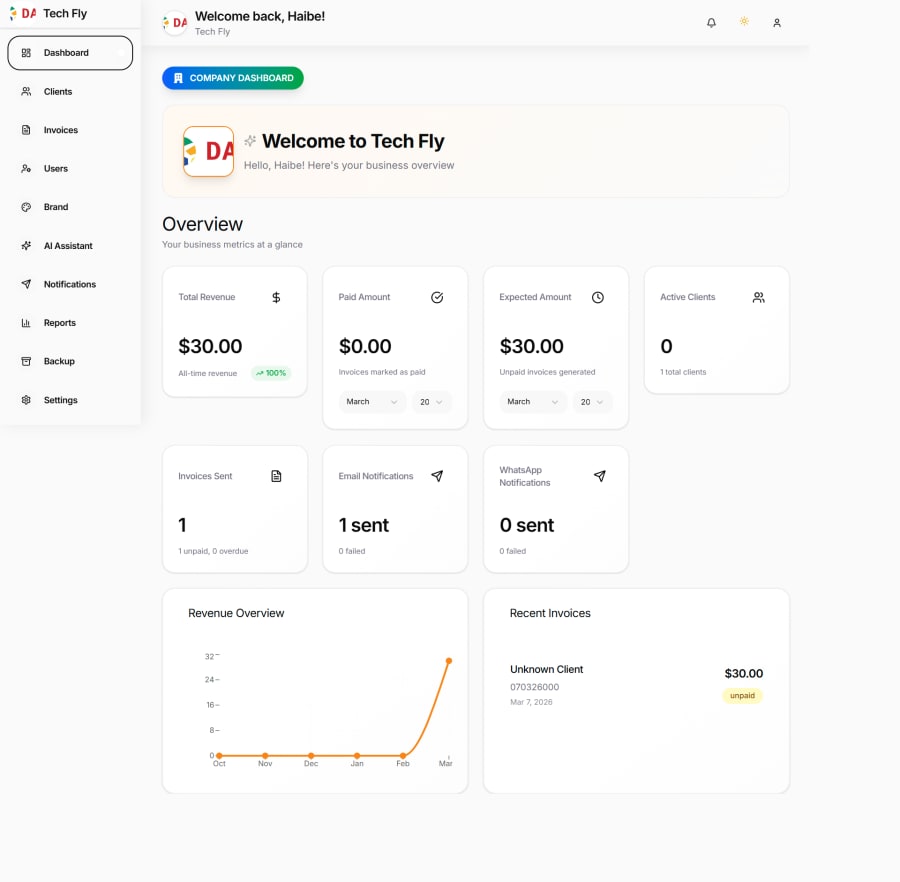
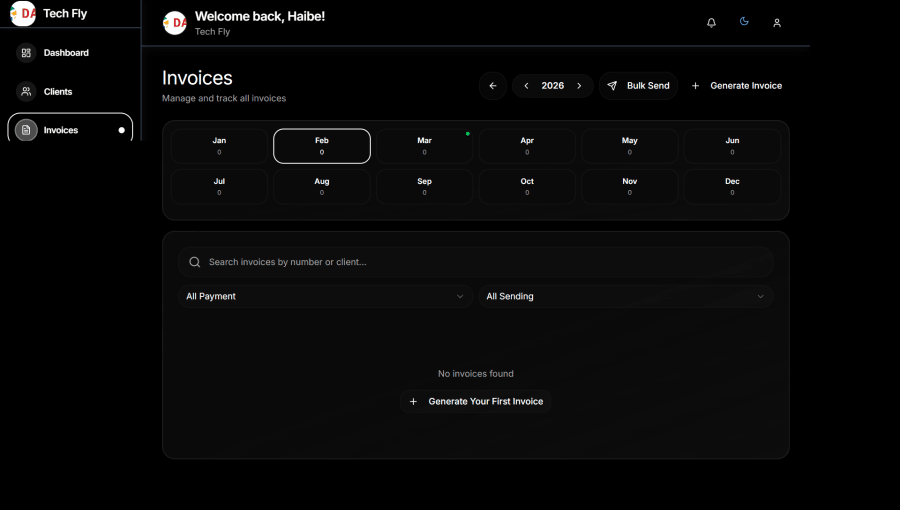
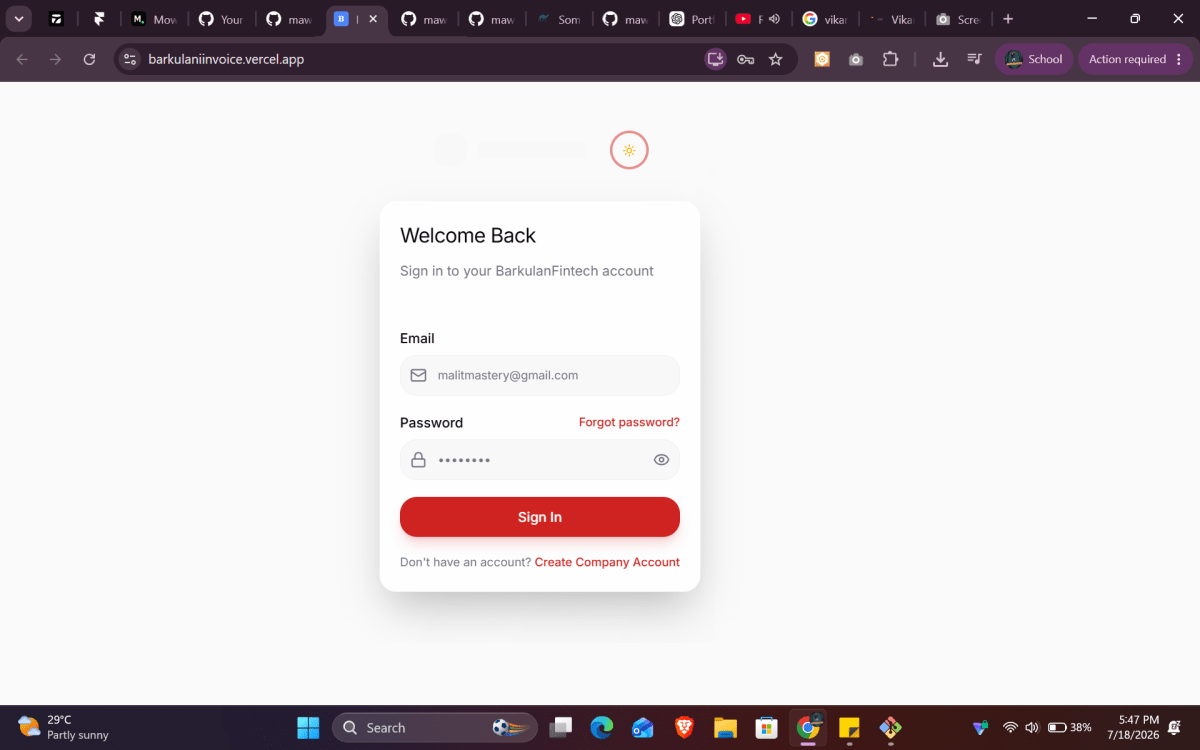
Skip to content mawlid1431 BarkulanFintech Repository navigation Code Issues Pull requests Agents Actions Projects Wiki Security and quality Insights Settings Owner avatar BarkulanFintech Private mawlid1431/BarkulanFintech Go to file t T Name mawlid1431 mawlid1431 completed for all the tasks 233933c · 4 months ago app completed for all the tasks 4 months ago components completed for all the tasks 4 months ago docs completed for that 4 months ago lib completed for all the tasks 4 months ago public added prevouse 4 months ago scripts completed for all the tasks 4 months ago styles added the brand and the invocies and recpt parts 4 months ago .env.example fixed ai 4 months ago .eslintrc.json Fix ESLint configuration for deployment 5 months ago .gitignore Initial commit: BarkulanFintech Invoice & Billing System with MongoDB… 5 months ago .vercelignore Optimize build configuration for Vercel deployment 5 months ago API_SCAN_REPORT.md completed for all the tasks 4 months ago DEPLOYMENT_READY.md completed for all the tasks 4 months ago INVITATION_SYSTEM_QUICK_GUIDE.md completed for all the tasks 4 months ago INVITATION_SYSTEM_UPDATES.md completed for all the tasks 4 months ago README.md added prevouse 4 months ago middleware.ts fixed for that user ) 4 months ago next.config.js added and fixed 5 months ago package-lock.json added ai chat 4 months ago package.json added ai chat 4 months ago postcss.config.js Initial commit: BarkulanFintech Invoice & Billing System with MongoDB… 5 months ago tsconfig.json version 5 months ago vercel.json fix: optimize Vercel deployment configuration 5 months ago Repository files navigation README BarkulanFintech 🚀 Enterprise-grade multi-tenant SaaS invoice generation and billing system with AI-powered analytics, automated workflows, and comprehensive business intelligence Next.js TypeScript MongoDB Tailwind CSS AI Powered License 📋 Overview BarkulanFintech is a production-ready, enterprise-grade multi-tenant SaaS platform designed for financial service providers and businesses requiring sophisticated invoice management. The system features AI-powered analytics, automated workflows, comprehensive reporting, and enterprise-grade security with complete data isolation between companies. Built with cutting-edge 2026 design aesthetics featuring smooth animations, glassmorphic UI elements, and a cohesive red/white branding scheme with professional dark mode support. 📸 System Screenshots 🔐 Authentication & Security Login Page with 2FA Secure login with two-factor authentication and modern glassmorphic design 📊 Dashboard & Analytics Main Dashboard Real-time business analytics with revenue tracking, KPI metrics, and interactive charts 📄 Invoice Management Invoice Management Comprehensive invoice tracking with status indicators, filtering, and bulk operations 👑 Super Admin Platform Super Admin Dashboard Platform-wide management with company oversight and system monitoring Company Management Multi-tenant company administration with status controls and detailed management Platform Analytics System-wide statistics, performance metrics, and business intelligence System Notifications Real-time system notifications and alerts management for platform administrators Want to add more screenshots? Place additional images in public/screenshots/ folder. See public/screenshots/README.md for guidelines on what screenshots to capture. 🛠️ Tech Stack Frontend Architecture Framework: Next.js 15.5 (App Router with Turbopack) Language: TypeScript 5.7 (Strict mode) Styling: Tailwind CSS 4.0 (Utility-first) Animations: Framer Motion 11.15 (Smooth transitions) UI Components: Radix UI (Accessible primitives) Icons: Lucide React (1000+ modern icons) Charts: Recharts 2.15 (Data visualization) Forms: React Hook Form 7.55 + Zod validation State Management: React Context + Custom hooks Backend & API Runtime: Node.js 18+ (Serverless functions) Database: MongoDB 6.12 + Mongoose 8.9 ODM Authentication: NextAuth.js 4.24 (JWT sessions) Email Service: Nodemailer 7.0 (SMTP integration) WhatsApp: WhatsApp Business Cloud API AI Integration: Groq + Google Gemini APIs Scheduling: Node-Cron 3.0 (Automated tasks) PDF Generation: jsPDF + PDFKit File Upload: Cloudinary integration Security: BCrypt.js + Zod validation AI & Analytics Primary AI: Groq Cloud (Llama 3.3 70B Versatile) Secondary AI: Google Gemini 2.5 Flash Features: Business analytics, system health, chat assistant Fallback System: Automatic provider switching Response Time: <1s (Groq), 1-3s (Gemini) Development & Deployment Build Tool: Next.js built-in (Turbopack support) Linting: ESLint (Next.js config) Type Checking: TypeScript strict mode Package Manager: npm/yarn/pnpm Deployment: Vercel Platform (Serverless) Database: MongoDB Atlas (Managed) CDN: Vercel Edge Network 🚀 Quick Start Prerequisites Node.js 18.0.0 or higher npm 9.0.0 or higher MongoDB Atlas account (free tier available) Email Provider (Gmail recommended for SMTP) Installation Clone the repository git clone https://github.com/your-org/barkulan-fintech.git cd barkulan-fintech Install dependencies npm install Set up environment variables cp .env.example .env.local Edit .env.local with your credentials: # Core Configuration NEXTAUTH_SECRET=your-super-secret-key-min-32-chars NEXTAUTH_URL=http://localhost:3000 MONGODB_URI=mongodb+srv://user:pass@cluster.mongodb.net/db # Email Configuration (Required) EMAIL_HOST=smtp.gmail.com EMAIL_PORT=587 EMAIL_USER=your-email@gmail.com EMAIL_PASSWORD=your-app-password EMAIL_FROM=your-email@gmail.com # WhatsApp Configuration (Optional) WHATSAPP_API_KEY=your-whatsapp-business-api-key WHATSAPP_PHONE_NUMBER=your-business-phone-number # AI Configuration (Optional but recommended) GROQ_API_KEY=your-groq-api-key GEMINI_API_KEY=your-google-ai-studio-key # Security (Optional) CRON_SECRET=your-cron-security-key Run the development server npm run dev Open your browser Navigate to http://localhost:3000 First-Time Setup Create Super Admin Account: Register the first user (becomes super admin) Set up Company: Create your first company via super admin panel Configure Email: Test email settings in company settings Add Clients: Start adding clients for invoice generation Generate Invoices: Create and send your first invoices Default Development Access The system uses invitation-based registration. The first registered user automatically becomes a super admin with platform-wide access. 📖 Documentation System Architecture - Complete technical architecture Installation Guide - Detailed setup instructions Migration Guide - React to Next.js migration notes Security Checklist - Security implementation guide API Documentation - Complete API endpoints reference Scripts Documentation - Testing and utility scripts 🏗️ Project Structure barkulan-fintech/ ├── app/ # Next.js App Router │ ├── api/ # API routes (40+ endpoints) │ │ ├── auth/ # Authentication & user management │ │ ├── clients/ # Client CRUD operations │ │ ├── invoices/ # Invoice management & PDF generation │ │ ├── notifications/ # Notification tracking & management │ │ ├── company/ # Company settings & branding │ │ ├── dashboard/ # Dashboard analytics & stats │ │ ├── backup/ # Data backup & recovery │ │ ├── super-admin/ # Platform management (multi-tenant) │ │ ├── cron/ # Automated scheduled tasks │ │ └── upload/ # File upload handling │ ├── dashboard/ # Protected dashboard pages │ │ ├── clients/ # Client management interface │ │ ├── invoices/ # Invoice management interface │ │ ├── reports/ # Business reports & analytics │ │ ├── company/ # Company settings │ │ ├── backup/ # Data recovery interface │ │ ├── ai/ # AI assistant interface │ │ ├── super-admin/ # Platform administration │ │ └── page.tsx # Main dashboard │ ├── (auth)/ # Authentication pages │ │ ├── login/ # Login with 2FA support │ │ ├── register/ # Company registration │ │ ├── forgot-password/ # Password reset request │ │ └── reset-password/ # Password reset with verification │ └── layout.tsx # Root layout with providers ├── components/ # React components │ ├── auth/ # Authentication forms & guards │ ├── dashboard/ # Dashboard widgets & charts │ ├── dialogs/ # Modal dialogs & forms │ ├── layout/ # Navigation & layout components │ ├── pages/ # Page-specific components │ └── ui/ # Reusable UI components (Radix UI) ├── lib/ # Utilities and services │ ├── db/ # Database models & schemas │ ├── auth.ts # NextAuth configuration │ ├── email-enhanced.ts # Email service with templates │ ├── whatsapp.ts # WhatsApp Business API │ ├── ai/ # AI service integration │ └── utils.ts # Utility functions ├── scripts/ # Testing & utility scripts │ ├── test-*.ts # Feature testing scripts │ ├── fix-*.js # Database migration scripts │ └── README.md # Scripts documentation ├── docs/ # Documentation │ └── SYSTEM_ARCHITECTURE.md # Complete system documentation ├── middleware.ts # Route protection & auth middleware ├── next.config.js # Next.js configuration └── tailwind.config.js # Tailwind CSS configuration 🔧 Available Scripts Script Description npm run dev Start development server with hot reload npm run build Build optimized production bundle npm run start Start production server npm run lint Run ESLint code analysis npm run type-check Check TypeScript types Testing & Utility Scripts Script Description npm run test:features Run comprehensive feature tests npm run test:health Quick system health check npm run test:company Test company registration flow npm run test:email Test email functionality npm run test:complete-flow Test complete invoice workflow Database Management Script Description npm run clear-database Clear all database collections npm run update-admin-email Update admin email address npm run send-scheduled-invoices Manually trigger scheduled invoice sending Automated Cron Jobs Script Description npm run test:unsent-reminders Test overdue invoice reminders npm run test:comprehensive Comprehensive reminder testing npm run test:mark-paid Test payment receipt generation 📡 API Routes Authentication & User Management POST /api/auth/login - User login with credentials + 2FA POST /api/auth/register - Company registration with invitation POST /api/auth/verify-code - Email verification for registration POST /api/auth/forgot-password - Request password reset POST /api/auth/reset-password - Reset password with verification POST /api/auth/change-password - Change existing password POST /api/auth/send-verification - Resend verification code POST /api/auth/verify-reset-code - Verify password reset code Client Management GET /api/clients - List company clients (paginated, filtered) POST /api/clients - Create new client with validation GET /api/clients/[id] - Get client details PATCH /api/clients/[id] - Update client information DELETE /api/clients/[id] - Soft delete client (recoverable) Invoice Management GET /api/invoices - List company invoices (filtered, sorted) POST /api/invoices - Create new invoice with duplicate check GET /api/invoices/[id] - Get invoice details with client info PATCH /api/invoices/[id] - Update invoice DELETE /api/invoices/[id] - Soft delete invoice (recoverable) POST /api/invoices/send - Send single invoice (email/WhatsApp) POST /api/invoices/bulk-send - Bulk send invoices with filters POST /api/invoices/check-duplicate - Check for duplicate invoices POST /api/invoices/[id]/mark-paid - Mark invoice as paid with receipt GET /api/invoices/[id]/pdf - Generate and download PDF Notifications & Communication GET /api/notifications - List user notifications with filtering POST /api/notifications/[id]/dismiss - Dismiss notification Company & Branding GET /api/company - Get company details and settings PATCH /api/company - Update company information POST /api/company/logo - Upload company logo (Cloudinary) Dashboard & Analytics GET /api/dashboard/stats - Dashboard statistics and KPIs Super Admin Platform Management GET /api/super-admin/companies - List all companies (platform view) GET /api/super-admin/companies/[id] - Get company details PATCH /api/super-admin/companies/[id] - Update company DELETE /api/super-admin/companies/[id] - Delete company PATCH /api/super-admin/companies/[id]/status - Update company status GET /api/super-admin/statistics - Platform-wide statistics POST /api/super-admin/invitations - Send company invitations GET /api/super-admin/invitations/verify/[token] - Verify invitation AI Analytics & Intelligence POST /api/super-admin/ai-analytics/chat - Chat with AI assistant GET /api/super-admin/ai-analytics/report - Generate AI business reports GET /api/super-admin/ai-analysis/system-health - System health analysis GET /api/super-admin/ai-analysis/system-health-basic - Basic health check GET /api/super-admin/ai-analysis/summary - Business summary analysis POST /api/super-admin/ai-analysis/notification - Analyze notifications System Notifications GET /api/super-admin/system-notifications - List system alerts PATCH /api/super-admin/system-notifications/[id] - Mark as read/dismissed Backup & Data Recovery GET /api/backup/clients - List deleted clients (recoverable) POST /api/backup/clients/[id]/restore - Restore deleted client DELETE /api/backup/clients/[id]/permanent-delete - Permanently delete GET /api/backup/invoices - List deleted invoices (recoverable) POST /api/backup/invoices/[id]/restore - Restore deleted invoice DELETE /api/backup/invoices/[id]/permanent-delete - Permanently delete GET /api/backup/export - Export complete company data Automated Cron Jobs GET /api/cron/send-scheduled-invoices - Send scheduled invoices (every 15 min) GET /api/cron/check-unsent-invoices - Check unsent invoices (daily 9 AM) GET /api/cron/init - Initialize cron jobs File Management POST /api/upload - Upload files (company logos, attachments) ⚙️ Automated Workflows Scheduled Invoice Processing Schedule: Every 15 minutes via Vercel Cron Endpoint: /api/cron/send-scheduled-invoices Action: Processes and sends scheduled invoices Notifications: Automatic email + WhatsApp delivery Status Tracking: Real-time delivery status updates Overdue Invoice Reminders Schedule: Daily at 9:00 AM via Vercel Cron Endpoint: /api/cron/check-unsent-invoices Action: Identifies invoices unsent for 7+ days Reminders: Automated reminder notifications Frequency: Every 7 days until sent or marked paid AI-Powered System Monitoring Real-time Health Checks: Continuous system performance monitoring Anomaly Detection: AI-powered identification of unusual patterns Automated Alerts: System notifications for critical issues Performance Analytics: Response time and error rate tracking Multi-Tenant Data Management Company Isolation: Automatic data scoping per company Backup Automation: Soft delete with recovery capabilities Audit Trail: Complete user activity logging Session Management: Automatic JWT token refresh 🎨 Design System Modern 2026 Aesthetics Design Language: Glassmorphic UI with smooth animations Color Palette: Red primary (#EF4444) with dynamic backgrounds Typography: Inter font family with responsive scaling Layout: Rounded-2xl design language throughout Animations: Framer Motion with custom easing curves UI Components Radix UI Primitives: Accessible, unstyled components Tailwind CSS 4.0: Utility-first styling approach Dark Mode: Professional light/dark theme switching Responsive Design: Mobile-first responsive breakpoints Icon System: Lucide React (1000+ modern icons) User Experience Smooth Transitions: 60fps animations and micro-interactions Loading States: Skeleton loaders and progress indicators Error Handling: User-friendly error messages and recovery Accessibility: WCAG-compliant components and keyboard navigation Performance: Optimized rendering and lazy loading 🔒 Security Features Authentication & Authorization ✅ JWT Sessions: 30-minute timeout with automatic refresh ✅ Two-Factor Authentication: TOTP-based 2FA support ✅ Password Security: BCrypt hashing with salt rounds ✅ Role-Based Access Control: Granular permissions system ✅ Session Management: Secure token handling and validation Data Protection ✅ Multi-Tenant Isolation: Complete data separation between companies ✅ Input Validation: Zod schema validation for all inputs ✅ MongoDB Injection Prevention: Parameterized queries and sanitization ✅ XSS Protection: React built-in XSS prevention ✅ CSRF Protection: Next.js built-in CSRF protection Infrastructure Security ✅ HTTPS Everywhere: Automatic SSL/TLS encryption via Vercel ✅ Environment Variables: Secure configuration management ✅ API Rate Limiting: Protection against abuse and DoS ✅ Audit Trails: Complete user activity tracking ✅ Data Recovery: Soft delete with backup collections Compliance & Monitoring ✅ Security Headers: Comprehensive HTTP security headers ✅ Error Handling: Secure error messages without data leakage ✅ Logging: Comprehensive security event logging ✅ Monitoring: Real-time security threat detection 📦 Deployment Vercel Platform (Recommended) Connect Repository # Install Vercel CLI npm install -g vercel # Deploy to Vercel vercel Environment Configuration Add all environment variables in Vercel dashboard Configure MongoDB Atlas connection string Set up email provider credentials Add AI API keys (Groq + Gemini) Cron Jobs Setup Vercel automatically configures cron jobs from vercel.json Scheduled invoice sending: Every 15 minutes Overdue reminders: Daily at 9:00 AM Production Configuration // vercel.json { "version": 2, "framework": "nextjs", "crons": [ { "path": "/api/cron/check-unsent-invoices", "schedule": "0 9 * * *" }, { "path": "/api/cron/send-scheduled-invoices", "schedule": "*/15 * * * *" } ], "functions": { "app/api/**/*.ts": { "maxDuration": 60 }, "app/api/invoices/bulk-send/route.ts": { "maxDuration": 300 } } } Alternative Platforms Railway: railway up (automatic deployment) DigitalOcean App Platform: Connect GitHub repository Custom VPS: Use PM2 for process management Docker: Containerized deployment support Database Setup MongoDB Atlas (Recommended) Create cluster (M2+ for production) Configure network access and database users Enable automatic backups Connection Optimization Use connection pooling Configure read/write concerns Set up monitoring and alerts See INSTALLATION.md for detailed deployment instructions. 🐛 Troubleshooting Common Issues & Solutions MongoDB Connection Issues # Check connection string format MONGODB_URI=mongodb+srv://username:password@cluster.mongodb.net/dbname?retryWrites=true&w=majority # Verify network access in MongoDB Atlas # Ensure IP whitelist includes your deployment platform Email Configuration Problems # Gmail Setup (Recommended) EMAIL_HOST=smtp.gmail.com EMAIL_PORT=587 EMAIL_USER=your-email@gmail.com EMAIL_PASSWORD=your-app-password # Not regular password! # Enable 2-Step Verification in Gmail # Generate App Password in Google Account settings NextAuth Configuration # Generate secure secret openssl rand -base64 32 # Ensure NEXTAUTH_URL matches your domain NEXTAUTH_URL=https://yourdomain.com # Production NEXTAUTH_URL=http://localhost:3000 # Development AI Integration Issues # Groq API Setup GROQ_API_KEY=gsk_... # Get from https://console.groq.com # Gemini API Setup GEMINI_API_KEY=AI... # Get from https://aistudio.google.com # Test AI functionality npm run test:health Cron Jobs Not Running Verify CRON_SECRET environment variable Check Vercel cron job configuration Monitor function logs in Vercel dashboard Ensure function timeout limits are appropriate Performance Issues Enable MongoDB connection pooling Optimize database queries with proper indexing Use Vercel Edge Functions for better performance Monitor function execution times Getting Help Check Logs: Review Vercel function logs for errors Test Scripts: Use provided test scripts to isolate issues Documentation: Refer to System Architecture Health Check: Run npm run test:health for system diagnostics More troubleshooting tips in INSTALLATION.md. 🤝 Contributing This is a proprietary project. For internal contributors: Development Workflow Fork the repository git clone https://github.com/your-org/barkulan-fintech.git cd barkulan-fintech Create a feature branch git checkout -b feature/amazing-feature Development setup npm install cp .env.example .env.local # Configure environment variables npm run dev Testing npm run test:features # Run feature tests npm run test:health # System health check npm run lint # Code quality check npm run type-check # TypeScript validation Commit and push git add . git commit -m 'Add amazing feature' git push origin feature/amazing-feature Open a Pull Request Provide detailed description of changes Include test results and screenshots Ensure all checks pass Code Standards TypeScript: Strict mode enabled, full type coverage ESLint: Follow Next.js recommended configuration Formatting: Consistent code formatting with Prettier Testing: Include tests for new features Documentation: Update relevant documentation Review Process All changes require code review Automated tests must pass Security review for sensitive changes Performance impact assessment 📄 License This project is proprietary software owned by BarkulanFintech. Copyright © 2026 BarkulanFintech. All rights reserved. 👥 Team & Support Development Team Lead Developer: BarkulanFintech Development Team UI/UX Design: Modern 2026 Aesthetics Team AI Integration: Machine Learning Engineering Team DevOps: Infrastructure & Security Team Technical Support Email: support@barkulanfintech.com Documentation: System Architecture Issue Tracking: Internal project management system Emergency Support: 24/7 system monitoring System Status Uptime Monitoring: Real-time system health tracking Performance Metrics: AI-powered performance analysis Security Monitoring: Continuous threat detection Backup Status: Automated daily backups with recovery testing 🙏 Acknowledgments Core Technologies Next.js - The React Framework for Production TypeScript - JavaScript with syntax for types MongoDB - Modern database for modern applications Tailwind CSS - Utility-first CSS framework Framer Motion - Production-ready motion library UI & Design Radix UI - Low-level UI primitives and icons Lucide React - Beautiful & consistent icon toolkit Recharts - Redefined chart library built with React React Hook Form - Performant, flexible forms AI & Analytics Groq - Ultra-fast AI inference engine Google Gemini - Advanced AI reasoning capabilities Zod - TypeScript-first schema validation Infrastructure & Services Vercel - Platform for frontend frameworks and static sites MongoDB Atlas - Multi-cloud database service NextAuth.js - Complete open-source authentication solution AI Performance Dual AI provider performance comparison and automatic failover system Special Thanks Build by Molwid - Original development and architecture Built with ❤️ using Next.js 15, TypeScript 5.7, and MongoDB 6.12 Version: 2.0.0 | Last Updated: March 11, 2026 | Architecture: Multi-tenant SaaS with AI Integration About barkulaniinvoice.vercel.app/ Resources Readme Activity Stars 1 star Watchers 0 watching Forks 0 forks Releases No releases published Create a new release Deployments 233 Production 4 months ago Preview + 231 deployments Packages No packages published Publish your first package Contributors 1 @mawlid1431 mawlid1431 Dev Mowlid Haibe Languages TypeScript 86.6% JavaScript 12.6% Other 0.8% Footer © 2026 GitHub, Inc. Footer navigation Terms Privacy Security Status Community Docs Contact Manage cookies Do not share my personal information